

How to See Custom Engraving Examples
Table of Contents
- Why Viewing Custom Engraving Examples Matters
- Where to Find Custom Engraving Examples Online
- Personalized Engraving Ideas for Gifts
- Engraving Quotes for Gifts That Work
- Engraving Font Examples and What to Expect
- Engraving Tips for Personalized Gifts
- How to Request and Approve a Custom Proof
- Frequently Asked Questions
Last Updated: October 7, 2026
Why Viewing Custom Engraving Examples Matters
When shopping for a personalized gift, seeing how custom engraving examples actually look matters more than reading descriptions. A preview shows font size, depth, placement, and overall appearance, helping you order with confidence.

Many retailers make this hard, offering generic stock photos rather than real previews. This guide covers where to find custom engraving examples, how to evaluate them, and how to request a proof before your order ships.
Where to Find Custom Engraving Examples Online
Most retailers display custom engraving examples in one of three places: product galleries, design collections, or customer showcases.

Product Gallery Pages
The easiest place to find custom engraving examples is the product page.
Design Collections and Templates
Many retailers organize custom engraving examples by category:
- Gift ideas by recipient (spouse, friend, parent)
- Examples by occasion (anniversary, birthday, wedding)
- Popular engraving quotes and messages customers have ordered
- Font galleries showing how typefaces render on the product
Customer Showcase or User-Generated Content
Some sites feature real customer photos of engraved items. These unfiltered images show what to expect, including lighting, aging, or wear, and are often more honest than polished product shots.
Social Media and Brand Accounts
Instagram, Pinterest, and Facebook often feature custom engraving examples from real customers, showing how engraving looks in actual use.
Personalized Engraving Ideas for Gifts
The best custom engraving examples show variety. Here are common personalized engraving ideas for gifts that work across products:

Simple monograms are timeless.
Dates That Matter
Anniversary, birth, or wedding dates make an item feel like a keepsake. "10.15.2026" or "Est. 2026" are popular formats.
Short Personal Messages
One or two words often work better than longer text.
Coordinates or Locations
GPS coordinates, a city name, or a meaningful address create a subtle but deeply personal engraving that works well on jewelry and smaller gifts.
Inside Jokes or Nicknames
A funny phrase or inside joke makes the gift feel unique and stands out more than generic messages.
When browsing custom engraving examples, notice message length: shorter text almost always engraves more cleanly.
Engraving Quotes for Gifts That Work
Engraving quotes for gifts must be short enough to fit and meaningful enough to justify the space. Examples that work well:
For Romantic Gifts
- "Forever Yours"
- "Love Never Fails"
- "You & Me"
- A meaningful date like an anniversary
For Friendship Gifts
- "Best Friends"
- "Sisters by Choice"
- "Always There for You"
- A shared inside joke or nickname
For Family Keepsakes
- "Family First"
- "Home Sweet Home"
- Names and birth years of children or grandchildren
- "Grandma's Kitchen" or similar family-focused phrases
For Achievement or Milestone Gifts
- "Congratulations"
- A graduation year or degree
- "New Beginnings"
- A professional title or achievement
When looking at custom engraving examples online, note how many words fit comfortably: a five-word quote looks very different on a small bracelet versus a larger plaque. The best examples show the same quote on different products.
Engraving Font Examples and What to Expect
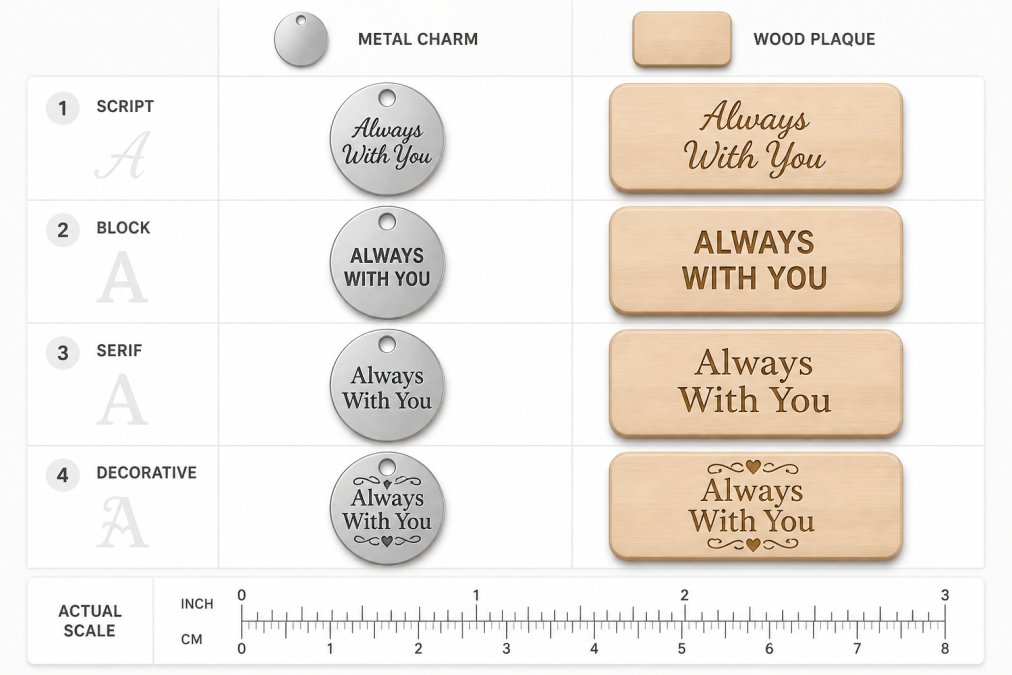
Font choice changes an engraving more than almost any other decision, and previews can mislead: a font that looks elegant at 200% zoom may fill in, chip, or disappear at actual size.
Script Fonts
Elegant, flowing, cursive-style text.
Custom Engraved 10.5oz Wine Glass — Personalized Engraving, Gift for Wine Lovers →
Block or Sans-Serif Fonts
Clean, modern, easy-to-read letters with uniform stroke width.
Serif Fonts
Traditional fonts with small strokes (serifs) at the ends of letters.
Decorative or Specialty Fonts
Unique, artistic fonts that add personality. These are the most eye-catching in examples and the most likely to disappoint, since they rely on fine internal detail, tight spacing, or overlapping strokes.
How the Engraving Method Changes the Font
The same font file produces different results depending on the method:
- Laser engraving removes a thin surface layer with a focused beam. It holds fine detail on metal, glass, coated materials, and leather, but on bare wood the beam burns the surface, so thin strokes can widen and blur.
- Rotary engraving cuts with a spinning cutter, producing a crisp, deep, permanent mark on metal and some plastics. The cutter has a minimum width, so strokes thinner than it cannot be reproduced and fine script detail is often lost.
- Hand engraving uses a graver pushed or struck by hand. It delivers the most character and depth on metal but is the least consistent for tiny text, depending on the individual engraver.
- Sandblasting blasts abrasive through a mask onto glass or stone, producing a soft, frosted look with no depth that cannot hold fine line detail, thin fonts read as a hazy patch.
A practical rule: the smaller the engraved area and the finer the method's resolution, the simpler the font should be. If you want script or decorative type, give it more space rather than shrinking it.
What to Check in Any Font Example
- Actual size, not zoomed size. Ask for the preview at 100% of the product's real dimensions, or hold a ruler to the screen.
- Thinnest stroke, not thickest. The thinnest line determines whether the engraving survives.
- Spacing between letters. Tight tracking closes up after engraving; generous tracking stays readable.
- The same text in multiple fonts. The best examples show one phrase rendered several ways on the same product.
- The same font on multiple materials. A font that reads cleanly on metal may fill in on wood or blur on frosted glass.
Engraving Tips for Personalized Gifts
Most engraving advice stops at "keep it short." The useful version explains why, and what to do when your message is long, your item is small, or your material is unforgiving.
Match Text Volume to Engraved Area
The biggest cause of disappointing engravings is too much text in too little space. Engravers think in minimum text height, the smallest letter size a method and material can reproduce legibly:
- Small charms, rings, and narrow bracelets: a few characters to a short word, in a simple block font.
- Standard pendants, keychains, and flasks: a short phrase or a name plus a date.
- Plaques, cutting boards, and large signs: multiple lines and longer messages.
If your message won't fit at a legible size, use a larger item or a shorter message, not a smaller font. Shrinking text past the method's limit produces the blurry, filled-in engravings people complain about.
Choose Contrast That Survives the Material
Contrast in engraving comes from how the mark interacts with light, not ink color:
- Bare metal: the engraved recess catches light differently than the polished surface, so the design reads as a tonal difference; deeper cuts and wider strokes read more strongly.
- Coated or painted metal: engraving removes the coating to reveal the metal underneath, creating a high-contrast, highly legible mark.
- Glass: laser or sandblasted engraving produces a frosted white mark that reads clearly against the transparent surface.
- Wood: the burn or cut darkens the surface, but grain direction and finish can reduce contrast, and thin lines can blur into the grain.
- Leather: engraving compresses or burns the surface, producing a darker, matte mark.
When reviewing examples, look at items made from the same material as your gift, contrast behavior does not transfer between materials.
Respect Stroke Width and Spacing
Every method has a minimum stroke width, and every font has a thinnest stroke. When the font's thinnest stroke is narrower than the method's minimum, it disappears or fills in. That's why bold, uniform-width fonts are reliable for small work and fine script and hairline serifs are risky below a certain size. Spacing matters too: letters placed too close together can merge once the cutter or beam widens each stroke, so leave visible space between characters and around the text block.
Prepare Your Artwork Before You Order
If your engraving includes a logo, monogram, or custom graphic, the file you submit determines the result:
- Vector files (SVG, AI, EPS, PDF) scale cleanly and give the engraver precise paths, the preferred format for logos and line art.
- Raster images (JPG, PNG) are made of pixels and must be large enough to convert without losing detail; low-resolution images produce jagged or mushy edges.
- Fonts should be converted to outlines or paths, or the exact font name supplied, so the engraver reproduces the typeface you intended.
- Line thickness should be checked against the method's minimum, very fine logo lines may need thickening.
If you don't have a suitable file, ask whether the retailer offers design help or a template.
Request a Proof and Review It at Scale
A proof is the last checkpoint before production and where most errors are caught. Check spelling, font, placement, and proportion, and view it at the product's actual size rather than zoomed in. Confirm the proof reflects the real material and method, since a digital mockup can look cleaner than the finished engraving.
| Decision | Why It Matters | What to Do |
|---|---|---|
| Text volume | Too much text forces an illegible font size | Match message length to the engraved area, or size up the item |
| Contrast | The mark must read against the material | Review examples on the same material as your gift |
| Stroke width | Thin strokes disappear or fill in | Choose uniform-width fonts for small work |
| Spacing | Letters merge after engraving | Leave visible gaps between characters |
| Artwork file | File quality caps the finished detail | Submit vector files; convert fonts to outlines |
| Proof | Catches errors before production | Review at actual size and confirm material and method |
How to Request and Approve a Custom Proof
Once you've chosen your design, request a proof, this is where you see what your custom engraving examples will look like before production.
Request a Digital Proof
Review the Proof Carefully
When you receive the proof, check:
- Is the text spelled correctly?
- Is the font what you selected?
- Is the placement where you wanted it?
- Does the size look proportional to the product?
- Do any design elements need adjustment?
Request Changes if Needed
If something doesn't look right, ask for revisions before approval.
Approve in Writing
Ask About Physical Proofs
For high-value items or gifts where appearance is critical, ask if the retailer offers a physical proof.
At Mayon Finds, we understand that seeing custom engraving examples and approving a proof before production gives you confidence in your purchase.
Choosing a personalized gift with custom engraving means creating something meaningful and lasting.
Frequently Asked Questions
Where can I see examples of custom engraving before I order?
Most custom engraving retailers, including Mayon Finds, display custom engraving examples in their product galleries and on individual product pages. You can browse finished pieces, view different engraving styles, and see how designs look on specific items like wine glasses or jewelry. Request a digital proof or sample photo from the vendor to see your exact personalization before final approval.
What should I look for when reviewing engraving examples?
Check the scale and placement of text relative to the item's size, verify that fonts are legible and match your style, and examine how the engraving method affects the surface finish. Look at examples on the same material and color as your intended gift. Pay attention to line thickness, spacing between words, and whether decorative elements (borders, symbols) remain clear and sharp.
Can I see how my personalized engraving will look on jewelry before ordering?
Yes. Vendors like Mayon Finds offer digital proofs showing your custom engraving on the specific piece of jewelry you're purchasing, such as the Break Apart Heart Necklace Set. Request a preview image that shows text placement, size, and finish. This helps you confirm that names, dates, or short messages will engrave clearly and fit proportionally on bracelets, necklaces, or pendants.
How do I know if my engraving design will actually work on the product?
Submit your design to the vendor and ask for a digital mockup or sample proof. Confirm that your text fits within the available surface area, fonts render clearly at the final size, and any artwork maintains contrast and legibility. For items like wine glasses or kitchen items, ensure the engraving placement doesn't interfere with function. Most vendors provide feedback on design adjustments needed for best results.