

How to Verify Custom Engraving Quality
Table of Contents
- Why Verifying Custom Engraving Quality Matters
- Step 1: Review the Engraving File and Approve the Custom Engraving Proof
- Step 2: Inspect Engraving Alignment and Placement on the Finished Piece
- Step 3: Assess Engraving Depth and Consistency Across the Workpiece
- Step 4: Examine Detail, Sharpness, and Surface Finish
- Step 5: Identify Engraving Defects and Rework Options
- Step 6: Test Durability and Wear Resistance
- Create Your Quality-Control Checklist
- Frequently Asked Questions
Last Updated: October 12, 2026
Why Verifying Custom Engraving Quality Matters
To verify custom engraving quality, remember that what you see in a proof isn't always what arrives.
Verifying custom engraving quality protects your investment by catching problems before they become permanent, a flawed engraving on a wine glass or necklace can't be undone.

This guide walks you through six steps to verify custom engraving quality: inspect the proof, measure placement, assess depth, examine surface finish, identify defects, and test durability.
Step 1: Review the Engraving File and Approve the Custom Engraving Proof
The proof is your first checkpoint, catch design issues before the engraver commits artwork to your substrate.
Compare the proof against your approved artwork
Place the proof next to your original artwork and check for exact matches in text, spacing, and line weight. For logos, verify every curve and detail rendered correctly.
Common issues: text sized differently than expected, altered fonts, shifted decorative elements, or mismatched colors on certain laser-engraved materials.
Check text legibility and line quality
Read the text aloud and zoom in, lines should be crisp and even, not fuzzy or broken.
Thin lines may not engrave cleanly on all materials and can disappear or blur.
Step 2: Inspect Engraving Alignment and Placement on the Finished Piece
Once the piece arrives, check alignment first, poor placement ruins even a perfect engraving.
Use a metric ruler to verify positioning
Measure distances from the engraving to the top, bottom, left, and right edges; they should match what you approved in the proof.
For example, if your wine glass engraving should sit 1 inch from the top and measures 1.25 inches, that's off. On symmetrical pieces, check both sides.
Check centering and spacing on the substrate
Check the overall composition: is the design centered on a round tumbler, or in the middle of a rectangular plaque with equal margins?
If your design has multiple elements (text plus a logo), measure the spacing between them, even 0.1 inches of drift can look wrong.
Step 3: Assess Engraving Depth and Consistency Across the Workpiece
Depth and consistency determine whether the engraving holds up over time. Most buyers skip this step, yet it separates a piece that still looks sharp after a year from one that fades or chips.
Measure depth with the right tool for the substrate
You don't need a metrology lab. A few inexpensive tools cover almost every case:
- Digital caliper with a depth rod: The workhorse for flat plaques, wood boards, and leather. Zero the caliper on the surrounding unengraved surface, then extend the depth rod into the engraved groove.
- Depth gauge or dial indicator: Better for repeatable readings on metal and for comparing multiple points quickly.
- Optical comparator or a phone macro lens with a ruler in frame: Useful for glass and crystal, where a physical probe can chip the edge of the engraving.
Acceptance tolerances by material
Exact tolerances vary by product, process, and equipment, so treat these as starting points.
| Material | Typical target depth | Watch for |
|---|---|---|
| Glass and crystal | 0.5-1 mm | Cracking, chipping at the groove edge, cut-through on thin walls |
| Metal (jewelry, barware) | 0.3-0.8 mm | Oxidation halo, burrs, depth drift on curved surfaces |
| Wood | 1-2 mm | Tear-out along the grain, charring, weakening of thin stock |
| Leather | 0.5-1 mm | Cut-through on thin hides, fuzzy edges, dye bleed |
| Coated items (painted, anodized, powder-coated) | Enough to cut the coating cleanly without gouging the substrate | Incomplete coating removal, ragged edges, exposed bare metal |
A practical consistency rule: across five or more sample points, depth should not vary by more than about 20 percent of the target. If your target is 1 mm on wood and you read 0.7 mm in one corner and 1.2 mm in another, that's a calibration or focus problem, not normal material variation.
Check for cut-through and structural compromise
Cut-through is the one defect that cannot be reworked. On a wine glass or tumbler, a groove reaching the interior wall creates a sharp edge and a stress point that can shatter under thermal shock.
Hold the piece up to a bright light, any pinhole through the engraved line means the material is compromised. On metal, flex gently and watch for a crack at the engraving.
Verify uniformity across the whole surface
Material uniformity drives engraving uniformity: a wood blank with a dense knot, glass with thick base and thin walls, or unevenly coated items all engrave differently across the same design.
Measure at five or more points, and reject any piece where depth varies by more than roughly 20 percent or where light passes through the engraving.
Step 4: Examine Detail, Sharpness, and Surface Finish
This is where you assess the actual quality of the engraved mark. A sharp, clean engraving looks professional. A dull, rough one looks cheap.
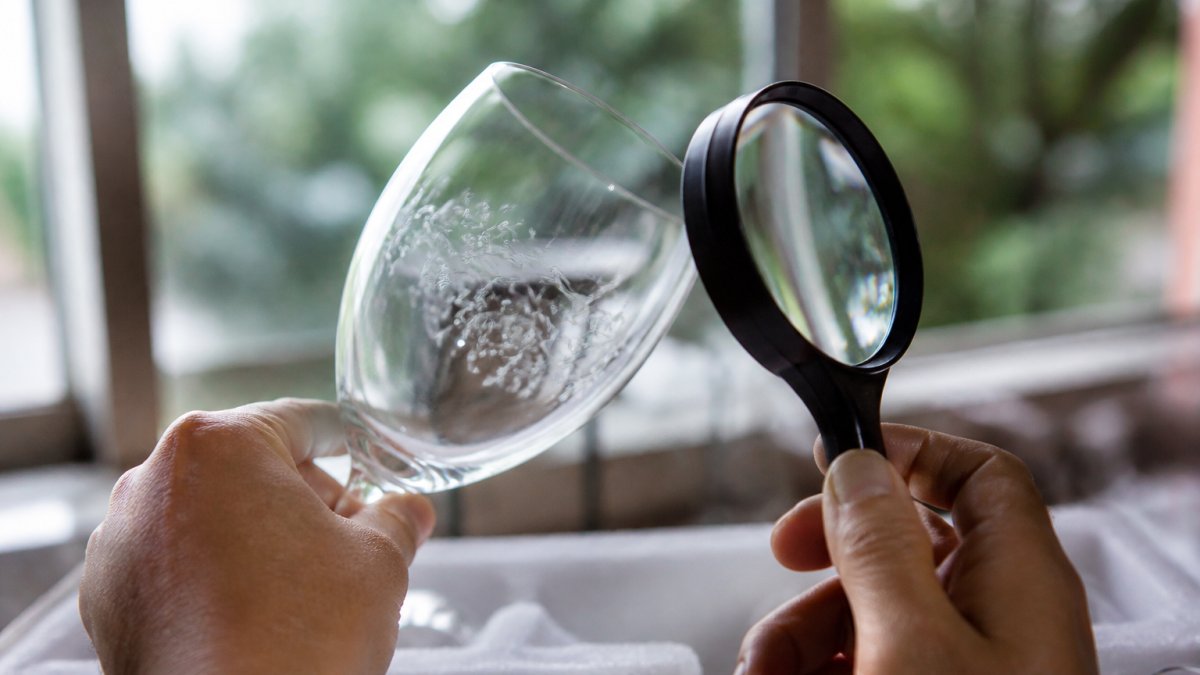
Inspect line quality and contrast
Hold the piece up to bright light. Engraved lines should be sharp and distinct, with clean edges rather than feathered or blurry ones.
Custom Engraved 10.5oz Wine Glass — Personalized Engraving, Gift for Wine Lovers →
Contrast matters too: on dark materials light engraving shows clearly, and on light materials the engraved surface should be noticeably darker or lighter than its surroundings.
Check small text and fine details closely: letters should have crisp edges, curves should be smooth, and every element of a detailed logo should be visible and sharp.
Look for burrs, rough edges, or material damage
Run a fingernail gently along the engraved area, you shouldn't feel sharp edges or rough spots.
On glass and some plastics, a frosted appearance is normal.
Check the surrounding material for scorch marks or heat damage, the laser should only affect the engraved area. Visible burning beyond the design means the laser power was too high.
Sharp, clean engraving with good contrast and no burrs is the hallmark of quality work. If the surface is rough or the lines are blurry, request rework.
Step 5: Identify Engraving Defects and Rework Options
Not every piece comes out perfect. Knowing what each defect means, what caused it, and whether it's fixable helps you decide whether to accept the piece or ask for a replacement.
Defect-to-cause-to-fix matrix
| Symptom | Likely cause | Corrective action |
|---|---|---|
| Blurry or fuzzy lines | Focus off, power too low, or speed too high | Re-focus, slow the speed, or increase power; re-run on a test blank first |
| Inconsistent depth across the design | Bed not level, material not flat, or focus drift on a curved surface | Re-level the bed, secure the workpiece, or use a rotary attachment for curved items |
| Misalignment or rotation | File origin set wrong, workpiece shifted, or fixture not square | Re-fixture, re-zero the origin, and re-engrave on a scrap piece to confirm |
| Cut-through on glass or thin stock | Power too high, too many passes, or material thinner than assumed | Reduce power or passes; the piece is compromised and should be replaced |
| Scorch marks or discoloration beyond the design | Power too high, speed too slow, or air assist insufficient | Lower power, raise speed, improve air assist, or add masking tape before engraving |
| Missing elements | File layer not set to engrave, vector not closed, or material defect | Check the file layers and vector paths; re-engrave if the material is sound |
| Burrs or raised edges on metal | Power too high for the alloy, or no finishing pass | Reduce power, add a light finishing pass, or deburr by hand |
| Weak contrast on dark material | Engraving not deep enough to expose the lighter substrate | Increase power slightly or use a contrasting fill; test on scrap first |
When rework is possible and when it is not
Replacement is the only option when the material itself is compromised: cut-through on glass or thin leather, deep scorch damage, missing elements on a one-of-a-kind piece, or severe misalignment that can't be hidden. On coated items, a defect exposing bare substrate usually can't be re-coated to match, so replacement is the practical path.
Document the defect before you contact the engraver
A clear case gets faster resolution. Before you reach out:
- Photograph the defect in raking light so the depth and edges are visible.
- Photograph the whole piece so the engraver can see placement and scale.
- Include your measurements: depth readings at each sample point, distance from edges, and the target tolerance you agreed on.
- Note the material, the design file name, and the order number.
Step 6: Test Durability and Wear Resistance
A quality engraving should last. Testing durability before you give a gift or use the piece regularly helps you catch problems early.
Material-specific durability checks
For glass and crystal: Hand wash in warm soapy water and dry thoroughly; the engraving should not fade or blur.
For metal jewelry and barware: Wipe with a soft cloth and mild soap.
For wood products: Wipe with a damp cloth and let dry.
For leather: Rub gently with a soft cloth.
Custom engraved wine glasses, tumblers, and jewelry pieces from Mayon Finds benefit from this durability test. Our custom engraved products like the Custom Engraved 10.5oz Wine Glass and Custom Engraved Bourbon Whiskey Glass are designed for regular use, hand washing and normal wear should not degrade the engraving.

Create Your Quality-Control Checklist
Use this checklist every time you receive a custom engraved piece. Print it or save it to your phone.
| Inspection Step | What to Check | Pass / Fail |
|---|---|---|
| Proof approval | Design matches artwork file, text is legible | ☐ |
| Alignment | Placement matches approved proof, centered correctly | ☐ |
| Depth measurement | Depth is within acceptable range for material, consistent across surface | ☐ |
| Surface finish | Lines are sharp, contrast is clear, no burrs or rough edges | ☐ |
| Detail quality | Fine elements are visible, curves are smooth, no blurring | ☐ |
| Defects | No cut-through, scorch marks, or missing elements | ☐ |
| Durability | Engraving resists light wear and cleaning | ☐ |
All items should show a checkmark before you accept the piece.
Verifying custom engraving quality protects your investment and ensures the finished piece meets your expectations. At Mayon Finds, we stand behind custom-engraved products like the Custom Engraved Break Apart Heart Necklace Set and Custom Engraved Bamboo Pizza Peel with Wood-Fired Oven Poem, each designed with precision and durability in mind.

Frequently Asked Questions
What should you check before approving a custom engraving?
Before approving your custom engraving, compare the finished piece against your approved proof to verify text accuracy and design placement. Check that the engraved image matches your submitted artwork, inspect line quality for sharpness and contrast, and use a metric ruler to confirm alignment and centering on the workpiece. Examine the engraving depth to ensure it is even across the entire substrate without cut-through. Look for any burrs, rough edges, or surface damage that would indicate a defect requiring rework.
Can you redo an engraving if it has a defect?
Engraving defects can sometimes lead to a replacement. If the engraving has shallow or uneven depth, misalignment, poor line quality, or burrs, contact the engraving provider immediately with photos of the defect. Document the issue clearly and compare the finished piece against your approved proof to support your request for a replacement.
How can you tell if an engraving is clear and evenly finished?
A clear, evenly finished engraving should have consistent depth and width across all lines and text. Examine the piece under bright, direct lighting and use a magnifying tool to inspect the line quality, edges should be sharp and clean without rough spots or burrs. The engraved area should have uniform contrast against the substrate material. Run your finger gently over the engraved surface to feel for any rough edges or inconsistencies. Check that the engraving does not fade or weaken in any section of the design, and verify that the surface finish of the material around the engraved area remains smooth and undamaged.
What are the recommended settings for laser engraving custom work?
Laser power, speed, and focus settings depend on the material and desired engraving depth. For custom engraving, test settings on a sample material or test blank first to verify the result before engraving your final workpiece. Always perform a test engraving on the same substrate type as your finished piece to confirm settings produce the desired depth, line quality, and contrast before committing to the final order.