

Smart Home Device Return Policy Explained
Table of Contents
- Smart Home Device Return Policy Explained: What You Need to Know
- Standard Return Window Duration and Proof of Purchase
- Returning Opened Electronics Policy: Condition Requirements
- Smart Home Device Restocking Fees and Penalties
- How to Factory Reset Smart Home Devices for Return
- Return Shipping, Labels, and Refund Processing Timelines
- Data Privacy, Subscription Cancellation, and Connected Device Returns
- Frequently Asked Questions
Last Updated: October 2, 2026
Smart Home Device Return Policy Explained: What You Need to Know
When you purchase a smart home device, the return policy becomes one of the most important details to understand before opening the box. Whether you're buying a video doorbell, smart lock, or connected security camera, knowing exactly what happens if the device doesn't meet your needs, or arrives defective, protects your investment and saves frustration down the line.

This guide breaks down the smart home device return process, covering proof of purchase requirements, restocking fees, factory resets, and subscription cancellation.
Return policies vary by manufacturer, retailer, and purchase channel. Some offer 30-day windows, others 60 days; some charge restocking fees, others don't. Understanding these distinctions before purchase prevents costly mistakes.
Standard Return Window Duration and Proof of Purchase
Most smart home device retailers offer return windows between 30 and 60 days from the date of purchase. The 30-day window is common for devices purchased through major online marketplaces, while many direct-from-manufacturer retailers extend to 45 or 60 days. The key is knowing which applies to your specific purchase.
Proof of purchase is required, keep your order confirmation email, invoice, or receipt immediately after purchase. Without it, you forfeit return eligibility.
The return window starts on the purchase date, not delivery date. If you order on January 15th, your 30-day window expires February 14th, regardless of arrival date.
Some retailers offer extended return windows (60-90 days) during November and December; check product pages for details.
Returning Opened Electronics Policy: Condition Requirements
Opened devices must be in resalable condition: no physical damage, all original components included, and fully functional.
Keep original packaging intact and all accessories (cables, mounts, documentation, security tags). Missing items may result in partial refund or rejection.
Handle devices carefully, scratches, dents, and wear reduce resale value. Some retailers accept minor cosmetic imperfections; others don't.
Ensure the device powers on and functions normally before initiating a return. Non-functional devices may be classified as defective, triggering a different process.
Smart Home Device Restocking Fees and Penalties
Restocking fees (10-20% of purchase price) offset processing and inspection costs for opened devices. Not all retailers charge them.
A $150 smart lock with a 15% restocking fee yields ~$127.50 refund. Check return policies before purchasing.

Early termination fees may apply if you cancel subscriptions (cloud storage, remote access) before the agreement ends.
Defective hardware is classified as a warranty claim, not a standard return, so restocking fees are waived.
How to Factory Reset Smart Home Devices for Return
Factory reset before return to erase personal data, WiFi credentials, and account associations. Failing to reset leaves your data on the device.
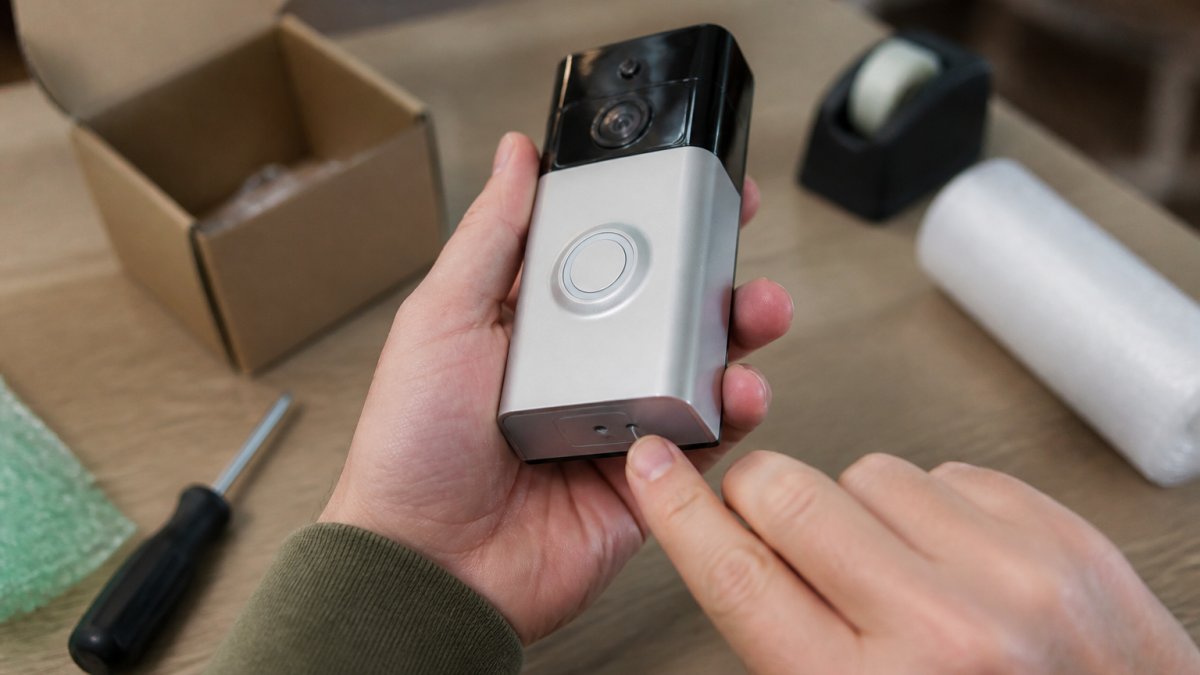
Most devices reset by holding a recessed button for 10-30 seconds until a light changes or beep sounds. Check your manual for exact steps.
Many devices allow app-based resets: open the app, navigate to settings, and select "Factory Reset" or "Clear All Data."
Return Shipping, Labels, and Refund Processing Timelines
Return shipping and refund timelines differ significantly between direct-manufacturer and third-party marketplace purchases.
Direct-Manufacturer Returns: Shipping and Timelines
Direct-manufacturer purchases include prepaid return shipping labels emailed when you initiate a return through the manufacturer's website or customer service.
Log into your account, select "Return," provide a reason, and be prepared to troubleshoot if needed.
You'll receive an RMA number and prepaid label. Write the RMA number on the package exterior and include it inside.
Ship using the provided label (standard ground shipping takes 5-10 business days). Track your shipment.
Manufacturers inspect within 5-10 business days, verify condition and functionality, then process refunds within 5-10 days. Total timeline: 2-4 weeks.
Some manufacturers offer store credit (applied within 24-48 hours) as an alternative to refunds.
Third-Party Marketplace Returns: Different Rules and Timelines
Marketplace purchases are managed by the marketplace, not the manufacturer, with different timelines and procedures.
Marketplace policies vary: 30-60 day windows, varying restocking fees, and prepaid or self-paid shipping. The marketplace policy governs, not the manufacturer's.
Log into your marketplace account, select "Return Item," provide a reason, and choose refund, replacement, or store credit.
Check whether return shipping is prepaid or your responsibility. If your responsibility, purchase a label yourself.
Ship according to marketplace instructions (ground shipping typically takes 5-10 business days).
Marketplace inspections take 10-15+ business days (longer than manufacturers), especially after holidays. Refunds process after inspection.
Marketplace refunds appear 5-10 days after approval, but total timeline is 4-6 weeks including inspection delays.
Some marketplaces hold refunds pending for days. Contact customer service for expedited refund options if needed.
Packaging and Shipping Best Practices
Use original packaging if available, it protects the device and demonstrates careful handling.
If original packaging is unavailable, use a sturdy box with bubble wrap and padding. Damage during shipping may result in denied returns or partial refunds.
Smart WiFi Video Doorbell – 720P HD Camera, Two-Way Audio, Motion Detection, SD →
Include all original accessories. Missing items may be deducted from your refund.
Include your RMA number on the package exterior and inside. This ensures tracking if the label is damaged.
Refund Processing and Dispute Resolution
Refunds appear in your original payment method within 5-10 business days after approval.
If your refund doesn't appear within the expected timeframe, contact customer service with your order number, RMA number, and shipping date. Request a carrier trace if needed.
Dispute unjustified denials or fees with your credit card company or bank using tracking numbers, RMA numbers, photos, and retailer communications.
Manufacturer vs. Marketplace: Which Should You Choose?
Direct-manufacturer purchases offer faster refunds and simpler processes. Marketplace purchases offer longer windows but slower refunds.
Buy direct from manufacturers for faster refunds if uncertain about a device. Buy from marketplaces for longer return windows, but expect slower refunds.
Data Privacy, Subscription Cancellation, and Connected Device Returns
Devices with subscriptions require additional steps: deactivate your account and cancel subscriptions. Missteps cause unexpected charges after return.
Understanding Subscription Coupling and Decoupling
When you purchase a smart home device with a subscription component, such as cloud video storage, advanced automation features, or professional monitoring, the subscription is tied to both your account and the physical device.
This is a critical distinction: returning the physical device does not equal canceling the service. Many customers discover this weeks or months later when they see a charge on their credit card statement for a device they no longer own.
Step-by-Step Subscription Cancellation Before Return
First, log into your manufacturer's online account dashboard or companion app. Locate the device you're returning and find the subscription or service settings associated with it. Most manufacturers display active subscriptions under a "Billing," "Subscriptions," or "Services" menu.
Second, identify the cancellation date. Some manufacturers allow immediate cancellation; others require you to cancel before the next billing cycle.
Third, confirm the cancellation in writing. After you click "Cancel Subscription," most platforms send a confirmation email. Save this email as proof that you canceled the subscription before returning the device.
Fourth, wait 24 to 48 hours before shipping the device back. This delay ensures the cancellation has fully processed in the manufacturer's system.
Account Deactivation vs. Subscription Cancellation
Account deactivation and subscription cancellation are separate actions. Deactivating the device removes it from your account in the manufacturer's system, but this does not cancel any paid services. You must perform both steps.
Account deactivation is typically found in the device settings within your app or online dashboard.
Subscription cancellation happens separately, usually in a "Billing" or "Account" section of your dashboard, not in the device settings.
Multi-Device Ecosystems and Subscription Complexity
If you own multiple devices from the same manufacturer, canceling the subscription for one device requires careful attention.
Before returning a device, verify whether its subscription is device-specific or account-wide.
For devices purchased through third-party marketplaces, the subscription may be managed through the marketplace platform rather than the manufacturer's system.
Data Privacy and Factory Resets
Beyond subscriptions, factory resetting your device before return protects your data privacy. A factory reset erases all personal data, WiFi credentials, and account associations from the device.
Perform the factory reset after you've canceled subscriptions and deactivated the device from your account. The reset process varies by device type and manufacturer.
Many smart home devices also allow factory resets through their companion app. Navigate to settings, find "Factory Reset" or "Clear All Data," and confirm. After a factory reset, your device returns to its original out-of-box state.
Timing and Documentation
Document the date you canceled your subscription. Take a screenshot of the cancellation confirmation email or the dashboard screen showing the subscription as "canceled" or "inactive." Keep this documentation with your return paperwork.
Wait at least 48 hours after canceling the subscription before shipping the device back. This buffer ensures the cancellation has fully processed.
Frequently Asked Questions
Can I return a smart home device if I've already opened the packaging?
Most retailers allow returns on opened smart home devices within the standard return window (typically 30 days), but the item must be in resalable condition with all original components and documentation. Some sellers impose restocking fees of 15-25% for opened merchandise. Check your specific retailer's policy before purchasing, as unopened items typically qualify for full refunds while opened ones may incur fees or partial credit.
Do I need to factory reset my smart home device before returning it?
Yes, factory resetting your device before return is essential for protecting your personal data and account information. Most manufacturers require this step to clear any stored WiFi passwords, cloud account logins, and usage history. The reset process varies by device type, some use a dedicated reset button, others require holding a button for 10-15 seconds. Always complete this step before shipping the device back to ensure your privacy.
What are typical restocking fees for returned smart home devices?
Restocking fees for returned electronics typically range from 15-25% of the purchase price, depending on whether the item is opened or unopened. Unopened merchandise often qualifies for full refunds without fees, while opened devices may face deductions. Some retailers waive restocking fees for defective hardware or items returned within 14 days. Always review the seller's restocking fee policy before checkout to understand potential deductions from your refund.
How long does it take to receive a refund after returning a smart home device?
Refund processing typically takes 5-10 business days after the retailer receives your returned device, though some sellers offer faster processing. The timeline depends on whether the item must be inspected for condition and whether you're receiving a full refund or partial credit due to restocking fees. Return shipping itself usually takes 3-7 business days depending on your carrier and location. Factor in both shipping and processing time when planning your return.