

Best Smart Home Gadgets for Commuters: 2026 Guide
Table of Contents
- Top Smart Home Gadgets for Commuters: Quick Comparison
- 4-Port Fast Charge Car Charger: Power for the Whole Car
- Magnetic Bendable Car Phone Holder: MagSafe Meets Wireless Charging
- Portable Power Banks: Solar, Compact, and Custom Options
- Can You Use Smart Plugs Without a Hub? Yes, Here's How
- Smart Home Automation for Busy Professionals: Set It and Forget It
- Car Comfort and Protection: Sun Shades, Floor Mats, and Coasters
- Frequently Asked Questions
Last Updated: September 13, 2026
Top Smart Home Gadgets for Commuters: Quick Comparison
The best smart home gadgets for commuters bridge two worlds: the car you spend hours in and the home you leave behind. Mayon Finds curates gear for that gap, chargers, mounts, power banks, and automation tricks that shorten the commute.
A smart home gadget is any connected device that automates, monitors, or controls part of your environment through an app, voice assistant, or scheduled routine. For commuters, the payoff is a home that runs itself while you're on the road.
Here's the quick version before the detail:
| Gadget | Price | Best For | Standout Feature |
|---|---|---|---|
| 4-Port Fast Charge Car Charger | $20.00 | Families and carpoolers | Four USB ports at once |
| Magnetic Bendable Car Phone Holder | $30.00 | Daily navigators | MagSafe plus wireless charging |
| Portable Solar Power Bank | $33.00 | Road trips and outages | 1.8 W solar panel, dual USB |
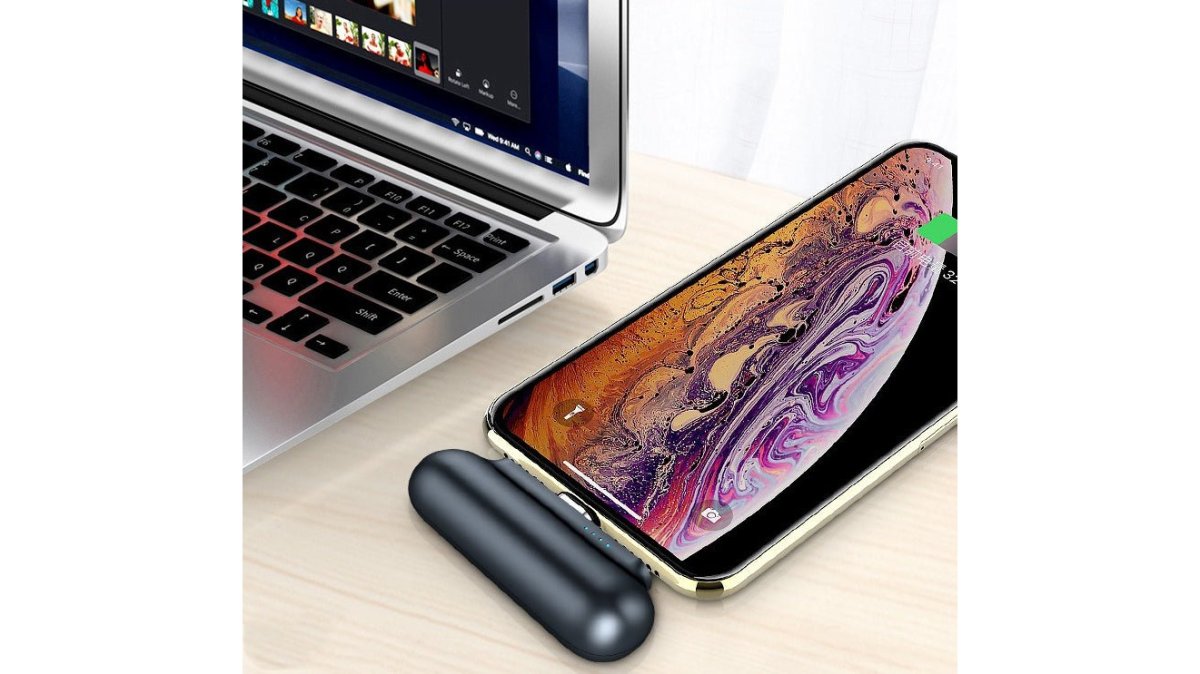
| Ultra-Compact Portable Charger | $26.00 | Pocket carry | 2,600mAh, 145g |
| Custom Magnetic Power Bank | $76.62 | Gifting | MagSafe, 5,000mAh, custom print |
4-Port Fast Charge Car Charger: Power for the Whole Car
The 4-Port Fast Charge Car Charger solves the oldest backseat argument: who gets the cable. It plugs into your 12V socket and fast-charges four devices at once, so phones, tablets, and earbuds all top up on the same drive.

At $20.00, it's a fix for a car full of low batteries. It needs no installation, and four ports means everyone leaves at full.
Magnetic Bendable Car Phone Holder: MagSafe Meets Wireless Charging
Mounts fail for one reason: clamps. The Magnetic Bendable Car Phone Holder with Wireless Charger skips them entirely. A MagSafe-compatible magnetic surface snaps your phone into place, and the bendable titanium alloy arm holds any angle.

Wireless charging runs while you navigate, so the cable stays in the glovebox. The 360° rotation switches portrait to landscape in a second, and the 3M adhesive mount leaves no residue. At $30.00, it replaces both a mount and a cable.
The honest limitation: magnetic mounting depends on a MagSafe-compatible case. A thick third-party case can weaken the hold.
Portable Power Banks: Solar, Compact, and Custom Options
Three power banks cover three different commuters.
The Clean Energy Anywhere Portable Solar Power Bank ($33.00) pairs a 1.8 W solar panel with dual USB outputs at 5V/2.1A, in standard or 30,000mAh versions. It's the one for camping or outages.

The Ultra-Compact Portable Charger ($26.00) is the pocket pick: 2,600mAh, 145g, triple output for Type-C, Apple, and Android, with four LED charge lights. It charges in about 2.5 hours.
The Custom Printed Magnetic Power Bank ($76.62) is the gift option: 5,000mAh, snaps onto MagSafe iPhones, supports Qi wireless, and carries a custom photo print on a removable shell.
Can You Use Smart Plugs Without a Hub? Yes, Here's How
Yes, you can use smart plugs without a hub. Most Wi-Fi smart plugs connect directly to your router over a 2.4GHz band and are controlled through the manufacturer's app. For a commuter, that matters because the plug is the cheapest way to make an empty house look occupied while you are gone ten or more hours.
The setup is straightforward:
- Plug the smart plug into a wall outlet near your router for initial pairing
- Download the manufacturer's app and create an account
- Put the plug in pairing mode, usually a long press on the power button
- Enter your Wi-Fi password in the app and wait for the connection confirmation
- Rename the plug for voice control, then move it to its permanent outlet
- Set schedules and away routines in the app
A hub only becomes necessary for local processing, Matter or Zigbee compatibility, or automations that keep running when the internet drops. For a commuter who wants the porch light on at 6pm, a Wi-Fi plug alone does the job.
The Empty-Home Security Play Most Commuters Miss
A long-distance commuter's home sits dark for 10 to 12 hours a day, five days a week, a predictable vacancy a Wi-Fi plug can disguise. The goal is not to light up the whole house, but to create small, irregular signals that read as "someone is home."
A practical setup uses three or four plugs on staggered schedules rather than one plug on a single timer:
- Living room lamp on at sunset, off around 11pm, with a randomized offset so it does not fire at the same minute every night
- Bedroom lamp on for 30 to 45 minutes after the living room goes dark, mimicking a person moving through the house
- Kitchen or hallway light on briefly in the early morning before your usual departure time
- Porch or entry light tied to a motion sensor or a geofence so it greets you on arrival instead of burning all day
Most manufacturer apps include a "randomize" or "away" toggle that shifts scheduled times by a few minutes daily. Turn it on. A light that clicks on at 6:00:00 every evening is a pattern; one that comes on at 6:04, then 5:57, then 6:11 is not.
What a Plug Can and Cannot Do for an Empty Home
Smart plugs are the entry tier of empty-home monitoring, with a clear ceiling:
- What they do well: control lamps, fans, holiday lights, and small appliances on a schedule or geofence; cut phantom draw from TVs, chargers, and set-top boxes; give you a remote on/off check through the app
- What they cannot do: see, hear, or detect motion. A plug knows only whether it is on or off, not that a window was forced or someone is in the hallway
- What to pair them with: a plug handles the appearance of occupancy; a camera or door/window sensor handles the detection of a problem. Run both, and the plug is the cheaper half of that pair
Choosing a Plug for a Commuter Household
Three specs decide whether a plug is worth it for someone away all day:
- Local schedule memory so routines survive a brief internet outage
- Away/randomize mode so your lighting pattern is not a giveaway
- Energy monitoring on at least one plug, so you can see what is drawing power while the house is empty and decide what to cut
None of these require a hub, just reading the app feature list before checkout, the step most buyers skip.
Smart Home Automation for Busy Professionals: Set It and Forget It
Smart home automation for busy professionals works best tied to your departure and arrival, not a clock. Geofencing uses your phone's location to trigger routines, so the house reacts to you rather than a schedule you have to remember. A timer assumes you left and returned on time; a commute rarely cooperates with either.
The Transition Workflow: Automating the Gap Between Home and Road
Most guides treat the home and commute as separate worlds. The real value is the transition between them, where geofencing earns its keep: your phone crossing a boundary triggers the house on both ends of the trip.
Departure trigger (leaving the geofence):
- Smart locks engage and confirm locked status in the app
- Interior lights drop to an away pattern rather than going fully dark
- Thermostat backs off to an energy-saving setpoint
- Robot vacuum starts its run so the floor is clean when you return
- Smart plugs cut phantom draw from TVs, chargers, and set-top boxes
- Security system arms to "away" mode
Arrival trigger (entering the geofence):
- Entry and porch lights come on before you reach the door
- Thermostat returns to your comfort setpoint so the house is not cold or stuffy
- Security system disarms
- Garage door opens if you have a connected opener
- A brief "welcome home" scene sets the kitchen or living room to your evening lighting
The payoff is not novelty: you stop doing six small manual tasks twice a day and stop second-guessing whether you locked the door or left the thermostat running.
Setting the Geofence Radius Correctly
The most common geofencing failure is a radius that is too wide. Set the trigger zone to a few hundred feet around your home, not a mile. A wide radius fires your arrival routine while you are still on the highway and your departure routine every time you pass the grocery store or gym.
A workable pattern:
- Radius: a few hundred feet, tight enough that only a genuine arrival or departure crosses it
- Dwell time: add a short delay (most apps offer one) so a quick trip to the mailbox does not trigger a full departure sequence
- Per-person rules: if two people commute on different schedules, geofence the routine to the last person leaving and the first person arriving, or you will arm the system while someone is still inside
Remote Management While You Are Away
The other half of commuter automation is checking and correcting from the road without pulling over.
- Live camera and doorbell feeds so you can see a delivery, a pet, or an unexpected visitor from a parked car or a train seat
- Lock and garage status so you can confirm or correct a door you are not sure about
- Thermostat adjustment so you can pre-cool or pre-heat before you walk in, rather than running the system all day
- Sensor alerts for motion, water leaks, and open doors, pushed to your phone in real time
The practical rule: automate what you always forget, and leave manual control for what you want to decide in the moment.
Energy Management That Pays Off on a Commute Schedule
A house empty ten hours a day can save money on autopilot. The highest-value moves for a commuter:
- Thermostat setbacks tied to departure and arrival rather than a fixed daily time, so a late night at the office does not mean heating an empty house
- Smart plug schedules to cut standby draw from entertainment centers and chargers during the workday
- Water heater or large-appliance scheduling if your devices support it, shifting heavy draw to off-peak hours where your utility offers time-of-use rates
CTA's smart home energy guidance notes that connected devices can meaningfully reduce standby power use when scheduled properly. The practical takeaway is simple: put the devices you forget on a schedule, and let geofencing handle the rest.
Car Comfort and Protection: Sun Shades, Floor Mats, and Coasters
A commuter car takes a beating: sun through the windshield, grit on the floor, condensation in the cup holders. The fix is unglamorous but effective.
The Custom Printed Car Sun Shade ($48.98) uses an aluminized film backing to reflect heat and block UV, protecting the dashboard, wheel, and seats. It installs with suction cups and folds flat into the glovebox.
The Custom Printed Car Floor Mat ($41.99) is 20oz loop polyester with a non-skid rubber backing, printed with a scenic mountain design. It protects the footwell and stays put.
For the small stuff, the Custom Printed Soapstone Car Coaster ($10.99) absorbs moisture and resists heat in natural soapstone, sold in sets of one, two, or four. Round it out with the Custom Printed Steering Wheel Cover ($10.48) in cushioned neoprene, which reduces hand fatigue, and the Transport Fleet AirPods Max Shell Case ($31.99) to keep headphones scuff-free.
For a complete commuter kit from Mayon Finds, this set covers heat, wear, and organization in one order.
Frequently Asked Questions
What are the must-have smart home gadgets for commuters in 2026?
A fast multi-port car charger, a magnetic wireless charging phone mount, and a portable power bank are the core essentials. For home integration, smart plugs and a video doorbell add security and convenience. These gadgets work together to keep your devices charged, your home monitored, and your morning routine smooth. Many commuters also add a smart speaker for voice control of lights and thermostats before leaving.
Can you use smart plugs without a hub?
Yes, most smart plugs connect directly to your Wi-Fi network and are controlled through a mobile app, no separate hub required. You can set schedules, timers, and voice control through Alexa or Google Assistant. A hub is only necessary if you want advanced automation across multiple brands or if you use Zigbee or Z-Wave plugs. For basic on/off scheduling and energy monitoring, a hub-free setup works well.
How do smart home devices help reduce morning stress for commuters?
Smart plugs can turn on coffee makers and lights at set times, while smart thermostats adjust temperature before you wake. A video doorbell lets you check deliveries or visitors from your phone. Automating these small tasks saves 10-15 minutes each morning and reduces the mental load of remembering every step. For busy professionals, this means leaving the house calmer and more prepared.
Do commuting gadgets work with existing smart home brands?
Most car chargers, mounts, and power banks are brand-agnostic and work with any smartphone. For home automation, check compatibility with your current ecosystem. Wi-Fi-based smart plugs generally work alongside Philips Hue, Ecobee, and Amazon devices without replacing anything. If you use a mix of brands, a hub like SmartThings or Hubitat can unify control, but it is not required for basic use.